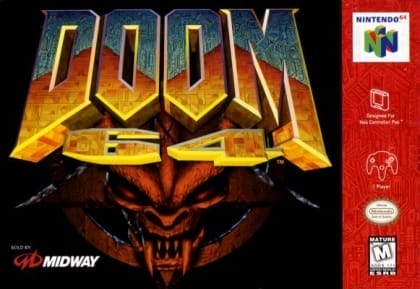
Doom 64

Overview

A first-person shooter developed as a standalone sequel in the Doom series, designed exclusively for the Nintendo 64. It features new levels, enhanced atmospheric music, and darker, more horror-inspired visuals.

Released in 1997 for Nintendo 64 and developed by Midway Games, Doom 64 is built around its original console experience. It is part of the Shooter genres.

You can launch Doom 64 directly in your browser without downloading a separate game client. Read the guide below before playing, then adjust the keyboard or controller settings for your device.
Playable in browserNo download requiredNintendo 64

Languages:English

Doom 64

A first-person shooter developed as a standalone sequel in the Doom series, designed exclusively for the Nintendo 64. It features new levels, enhanced atmospheric music, and darker, more horror-inspired visuals.

Play Now

Opens the game player in a new browser tab.

Plays
9
Views
168

Related Games

How to Play

Your goal is to survive through each level, find the exit, and defeat the demonic forces of Hell. You navigate maze-like environments from a first-person perspective, using a variety of weapons like the shotgun, chaingun, and the powerful Unmaker to eliminate enemies.

Keys are required to unlock colored doors and progress. Health, armor, and ammunition are scattered throughout the maps, so thorough exploration is key.

A good beginner strategy is to conserve ammo for stronger weapons by using the pistol on weaker foes, and to always listen for audio cues that signal enemy presence or secret areas. The challenge rhythm involves clearing rooms of monsters, solving simple environmental puzzles to find keys, and managing your resources carefully.

In tense moments, such as ambushes by powerful enemies, keep moving to avoid projectiles and use the super shotgun or rocket launcher for quick crowd control.

Browser controls and troubleshooting

If the keyboard does not respond, click the game screen first and check the actual key mappings in the player controls. Arrow keys scrolling the page can mean the game does not have input focus.

On a phone, check whether the player provides touch buttons. Try landscape or fullscreen if the controls are too small. After connecting a gamepad, press a button with the game focused and check whether the player recognizes it.

For a black screen or a stalled load, wait briefly before using Reload player or Browse games in the embedded player or play page. Reloading restarts the player and may lose unsaved progress. If no save option is available, do not rely on refreshing to preserve progress.

Related guide

Learn why controller setup and analog input matter for many Nintendo 64 games.

Read: Retro Game Controller Guide

Playing ROMs in a browser

Review controls, save methods, browser storage and platform limitations before starting a long session.

Read the browser ROM guide

FAQ

Can I play Doom 64 online?

Yes. You can play Doom 64 directly in your browser. Open the game page and click play to start without setting up an emulator first.

Do I need to download anything to play Doom 64?

No. Doom 64 is available as a no-download browser game, so you can start playing without installing extra software or downloading files.

What platform or genre is Doom 64?

Doom 64 is a Nintendo 64 game in the Shooter category. You can use the platform, genre, and related games sections to find similar titles.

What devices can run Doom 64?

Mobile compatibility and touch controls depend on the game and player. Check the controls shown after Doom 64 starts.

Who developed Doom 64?

Doom 64 is listed with developer information for Midway Games. You can also browse related games from the same developer or genre.