Mario Kart 64

Overview

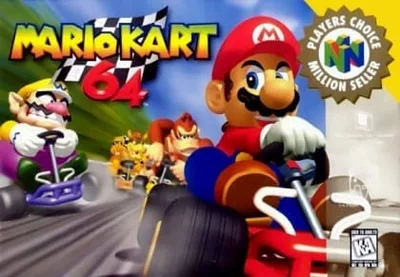
Mario Kart 64 is a kart racing game for the Nintendo 64 where players choose from various Mario series characters to race on imaginative tracks, using items to gain an advantage.

Released in 1996 for Nintendo 64 and developed by Nintendo EAD, Mario Kart 64 is built around its original console experience. It is part of the Racing genres.

You can launch Mario Kart 64 directly in your browser without downloading a separate game client. Read the guide below before playing, then adjust the keyboard or controller settings for your device.
Playable in browserNo download requiredNintendo 64

Languages:English

Mario Kart 64

Mario Kart 64 is a kart racing game for the Nintendo 64 where players choose from various Mario series characters to race on imaginative tracks, using items to gain an advantage.

Play Now

Opens the game player in a new browser tab.

Plays
57
Views
269

Related Games

How to Play

The objective of Mario Kart 64 is to finish races in first place across a series of cups. You select a character and kart, each with slightly different handling and speed stats, and compete against seven computer-controlled racers on a variety of tracks.

During a race, you drive using the control stick to steer and the A button to accelerate. You can perform power slides by tapping the R button while turning to get a temporary speed boost.

Item boxes scattered on the track grant random power-ups, such as shells to attack opponents, bananas to create slippery hazards, or a star for temporary invincibility and high speed. Strategic use of these items is key to disrupting rivals and protecting your position.

Beginners should focus on learning the track layouts and mastering the timing of power slides. In the early laps, concentrate on collecting items and maintaining a clean line through corners.

During the final lap, when the competition intensifies, hold onto defensive items like bananas or shells to block incoming attacks and make a decisive push for the lead.

Browser controls and troubleshooting

If the keyboard does not respond, click the game screen first and check the actual key mappings in the player controls. Arrow keys scrolling the page can mean the game does not have input focus.

On a phone, check whether the player provides touch buttons. Try landscape or fullscreen if the controls are too small. After connecting a gamepad, press a button with the game focused and check whether the player recognizes it.

For a black screen or a stalled load, wait briefly before using Reload player or Browse games in the embedded player or play page. Reloading restarts the player and may lose unsaved progress. If no save option is available, do not rely on refreshing to preserve progress.

Related guide

Learn why controller setup and analog input matter for many Nintendo 64 games.

Read: Retro Game Controller Guide

Playing ROMs in a browser

Review controls, save methods, browser storage and platform limitations before starting a long session.

Read the browser ROM guide

FAQ

Can I play Mario Kart 64 online?

Yes. You can play Mario Kart 64 directly in your browser. Open the game page and click play to start without setting up an emulator first.

Do I need to download anything to play Mario Kart 64?

No. Mario Kart 64 is available as a no-download browser game, so you can start playing without installing extra software or downloading files.

What platform or genre is Mario Kart 64?

Mario Kart 64 is a Nintendo 64 game in the Racing category. You can use the platform, genre, and related games sections to find similar titles.

What devices can run Mario Kart 64?

Mobile compatibility and touch controls depend on the game and player. Check the controls shown after Mario Kart 64 starts.

Who developed Mario Kart 64?

Mario Kart 64 is listed with developer information for Nintendo EAD. You can also browse related games from the same developer or genre.