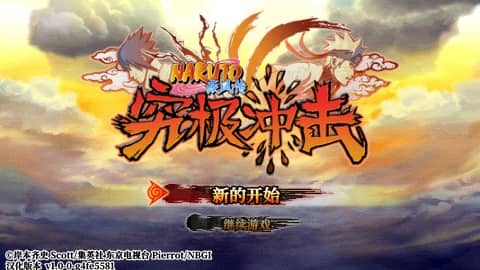
Naruto Shippuden: Ultimate Ninja Impact
Playable in browserNo download requiredPlayStation Portable

Languages:English

Play Naruto Shippuden: Ultimate Ninja Impact Online

Naruto Shippuden: Ultimate Ninja Impact is CyberConnect2’s 2011 PSP action game. Control Naruto and other characters in large battles against groups of enemies and story bosses.

Play Now

Opens the game player in a new browser tab.

Plays
341
Views
938

Play Naruto Shippuden: Ultimate Ninja Impact in Your Browser

Play Naruto Shippuden: Ultimate Ninja Impact online. Fight large enemy groups, complete story missions and learn how the original PSP ad hoc co-op differs.

Open game page

Related Games

Overview

Story Battle follows events from Naruto Shippuden through mission-based stages. Combat emphasizes movement, crowd attacks, substitutions and character-specific techniques rather than the one-on-one structure of some other Ultimate Ninja games.

The original PSP release supported one player and two-player ad hoc cooperative play. A browser emulator does not automatically reproduce PSP ad hoc networking, so this page does not promise online co-op.

How to Play

Check the PSP button mapping before starting a mission. Practice movement, normal attacks, chakra use, guarding and substitution timing against early groups.

Avoid standing inside a crowd after completing a combo. Reposition, watch warning indicators and save stronger techniques for dense groups or tougher targets.

Review mission conditions and character setup before deployment. Upgrade or customize the available character when the game opens those options, then replay stages if you need more practice.

Game references

Browser controls and troubleshooting

If the keyboard does not respond, click the game screen first and check the actual key mappings in the player controls. Arrow keys scrolling the page can mean the game does not have input focus.

On a phone, check whether the player provides touch buttons. Try landscape or fullscreen if the controls are too small. After connecting a gamepad, press a button with the game focused and check whether the player recognizes it.

For a black screen or a stalled load, wait briefly before using Reload player or Browse games in the embedded player or play page. Reloading restarts the player and may lose unsaved progress. If no save option is available, do not rely on refreshing to preserve progress.

Playing ROMs in a browser

Review controls, save methods, browser storage and platform limitations before starting a long session.

Read the browser ROM guide

FAQ

Who developed Ultimate Ninja Impact?

CyberConnect2 developed the game and Bandai Namco Games published the original PSP release.

What kind of combat does it use?

It is a mission-based action game built around large groups of enemies, playable Naruto Shippuden characters and boss encounters.

Does browser play support two-player co-op?

It is not guaranteed. The PSP game used local ad hoc communication, which requires explicit support from the browser emulator.